
MediaMonkey
- 安卓
- 2025-12-22
- ⏳ 已提交(09-20 18:37)
- 73 ℃
- 0 评论
摘要
 媒体播放器严重的收藏家您的设备和PC之间的同步。
MediaMonkey
来自于互联网
备案号:待更新
 安卓
安卓《MediaMonkey》游戏 APP 是来自于互联网开发的安卓系统应用软件,版本号:1.3.4.0854,由丢塔游戏网整理,欢迎下载体验。
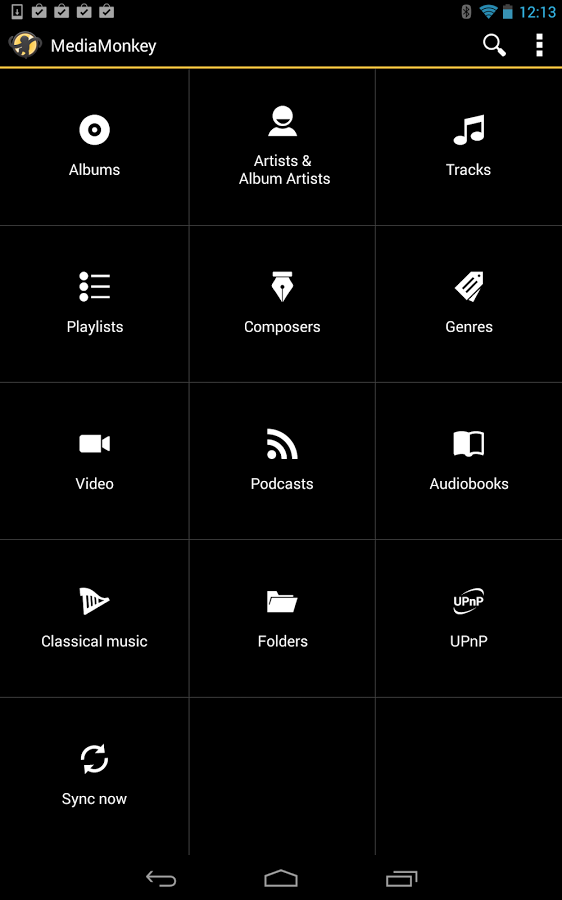
A media player for serious collectors that syncs your collection between Android and Windows.MediaMonkey helps you navigate and manage and sync large music collections. Key features in the initial release:- Wirelessly sync Playlists and media (including file info, ratings, lyrics, play history, etc.) with MediaMonkey for Windows 4.1 *- Manage Music, Classical music, Audiobooks, Podcasts, Video, etc...- Navigate by Artist, Album, Composer, Genre, Playlist, etc.) with support for multiple attributes (e.g. Genre=Rock;Alternative)- Navigate by Folder *- Play any content supported by your Android device (it relies on Android codecs), with replay gain (volume leveling), an equalizer, and sleep timer- Bookmarking for large files (e.g. Audiobooks, videos)- Access, play, and download media from UPnP/DLNA servers *- Player widgets for home screen or lock screen- Lock Screen Player for Android < 4.2- Lyrics lookup **- Edit properties for single/multiple files- Manage single/multiple files (e.g. play, queue, playlist management, delete, use as ringtone, share)- Playlist management with hierarchy- Now Playing views: Individual (swipeable UI for in-car use) / Tracklist- Compatible with with third-party scrobblers (Simple Last.fm, Scrobble Droid, Last.fm)- Compatible with Beats audio on HTC devices- Full-library search- etc...* Time limited without upgrade. USB Sync is unrestricted.Available Upgrades:----------------------------------------------Wi-Fi Sync addon: Allows unlimited wireless synchronization. Available as an in-app purchase.UPnP/DLNA addon: Allows unlimited UPnP/DLNA usage. Available as an in-app purchase.Advanced Media Management addon: Allows unlimited lyrics lookup, home screen customization, folder browser, with more to come. Available as an in-app purchase.MediaMonkey Pro: Provides all of the addon features described above in one bundle. Available in the App Store.Explanation re. Permissions:----------------------------------------------Storage: Read, modify or delete the contents of your USB storage - to sync/download content via UPnPYour accounts: find accounts on the device - to allow purchases of feature upgradesNetwork communication: full network access, pair with bluetooth devices - for Wi-Fi sync / UPnP & bluetooth playbackHardware controls: change your audio settings - for audio/video playbackSystem Tools: - allow Wi-Fi Multicast reception - for UPnP/DLNA- change system display settings - for uninterrupted video playback- connect and disconnect from Wi-Fi - for Wi-Fi Sync and UPnP/DNA- modify system settings - for audio settings- prevent tablet from sleeping - for video playback- retrieve running apps - to show/hide the tray iconDevelopment tools: test access to protected storage - to sync/download content via UPnPNetwork communication: - Google Play billing service - to buy feature addons- view network connections - for WiFi sync / UPnP- view Wi-Fi connections - for WiFi sync / UPnPSystem tools: install shortcuts - to create shortcuts to playlistsRead phone status and identity - to hide the Lock Screen Player (only on versions of Android < 4.2) during a phone callDisable your screen lock - to allow for a Lock Screen Player on versions of Android < 4.2
《MediaMonkey》公司开发
来自于互联网
《MediaMonkey》软件版本
1.3.4.0854